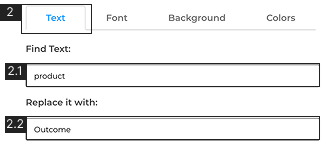
Find and Replace can be accessed from Edit > Find and Replace
Text 2.1 Insert the text that you want to find2.2 Insert the text that you want to replace it with
Select the slides you want the text to be replaced
Click ‘Replace’ to make the changes
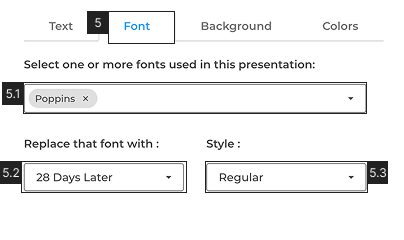
Font 5.1. Select the font/s that you want to replace5.2 Select the font that you want to replace with5.3 Select the font ‘Style’
Select the slides you want the font to be replaced #3
Click ‘Replace’ to make the changes #4
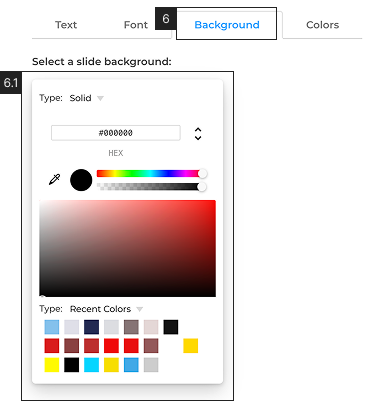
Background6.1 Select the color that you want to replace from the color picker. Learn more about color picker in Fill
Select the slide you want to replace the background color #3
Click ‘Replace’ #4
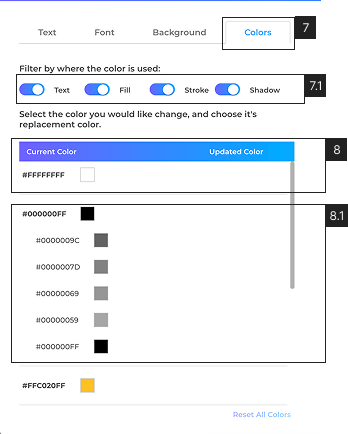
Colors7.1 Select from where you want to replace the colors from [Text, Fill, Stroke, Shadow]8 Click on the colour you want to replace and pick a color you want to replace with (you can replace multiple colours at the same time)
8.1 Different opacity shades of the same color in a presentation are grouped together. Click the parent color to apply changes to all its child colors, or select an individual child color to modify it specifically.
Select the slides you want to replace the color/s #3
Click ‘Replace’ #4
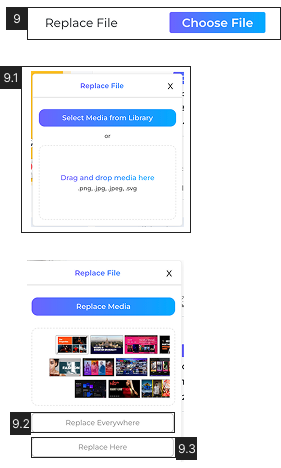
Select the media you want to replace in the deck.
On the right side properties panel click ‘Replace Media’ 9.1 From the pop-up either choose a media file from the ‘Media Library’ or drag and drop a new file from the desktop.9.2 Choose to replace the media on all slides with ‘Replace Everywhere’9.3 Choose to replace the media at the current slide with ‘Replace Here’
For media files, You can only replace a media file with the same type, i.e images with images, and videos with videos.
Book Free Consultation
Sales Enablement Content Audit
THANK YOU !
"For your interest in Sales Enablement Content Audit. We will follow up within one business day to schedule a time for the audit."