
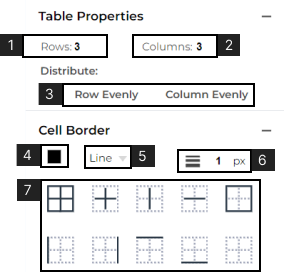
- 1. View or set the number of rows.
- 2. View or set the number of columns.
- 3. Select to make the width of the Row or the height of the column even across the table.
- The following can be applied to the whole table or highlighted cells:
- 4. View or set the table Fill.
- 5. Learn more about Fill.Select the style of borders.
- 6. View or set border thickness (in pixels).
- 7. Add or remove Cell Borders.