 CustomShow Help & Resources
How To Find & Replace
Text | Media
- 1. Find and Replace can be accessed from Edit > Find and Replace

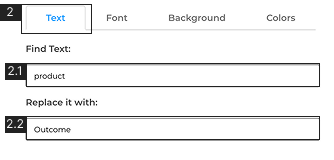
- 2. Text
- 2.1. Insert the text that you want to find2.2 Insert the text that you want to replace it with
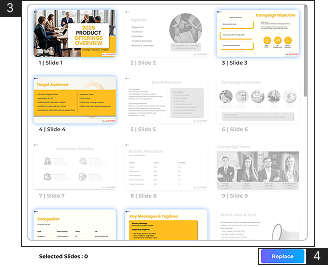
- 3. Select the slides you want the text to be replaced
- 4. Click ‘Replace’ to make the changes
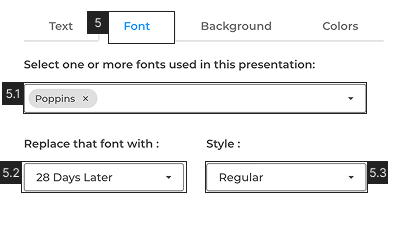
- 5. Font
- 5.1. Select the font/s that you want to replace5.2 Select the font that you want to replace with5.3 Select the font ‘Style’
- Select the slides you want the font to be replaced #3
- Click ‘Replace’ to make the changes #4
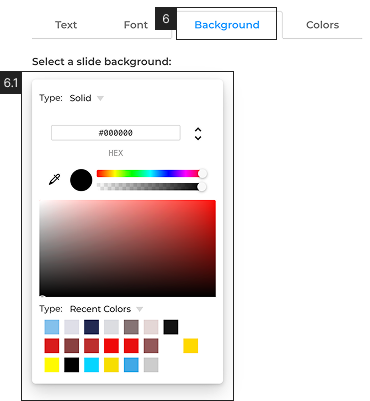
- 6. Background
- 6.1. Select the color that you want to replace from the color picker. Learn more about color picker in Fill
- Select the slide you want to replace the background color #3
- Click ‘Replace’ #4
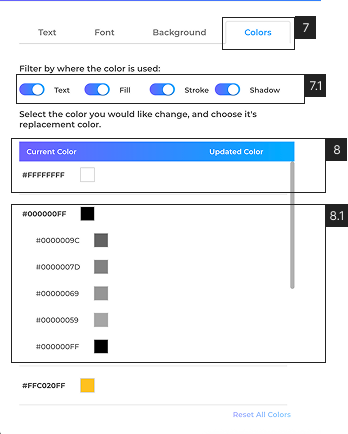
- 7. Colors
- 7.1. Select from where you want to replace the colors from [Text, Fill, Stroke, Shadow]
- 8. Click on the colour you want to replace and pick a color you want to replace with (you can replace multiple colours at the same time)
- 8.1. Different opacity shades of the same color in a presentation are grouped together. Click the parent color to apply changes to all its child colors, or select an individual child color to modify it specifically.
- Select the slides you want to replace the color/s #3
- Click ‘Replace’ #4
- Select the media you want to replace in the deck.
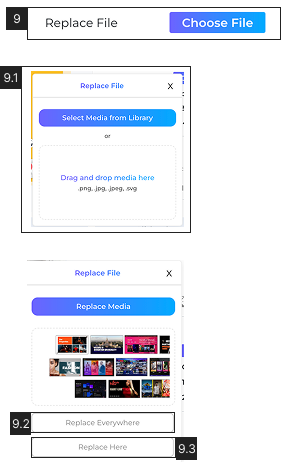
- 9. On the right side properties panel click ‘Replace Media’
- 9.1. From the pop-up either choose a media file from the ‘Media Library’ or drag and drop a new file from the desktop.
- 9.2. Choose to replace the media on all slides with ‘Replace Everywhere’
- 9.3. Choose to replace the media at the current slide with ‘Replace Here’
- For media files, You can only replace a media file with the same type, i.e images with images, and videos with videos.