
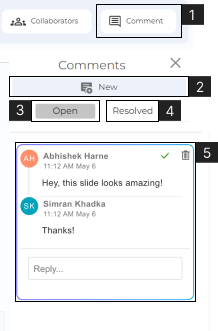
- Comments are a great way to communicate with other collaborators on CustomShow.
- 1. Click on ‘Comment’ to access the comment section. Located above the properties panel in the top right corner.
- 2. Click ‘New’ to add a comment on a slide.
- 3. Click to view ‘Open’ Comments.
- 4. Click to view ‘Resolved’ Comments.
- 5. Click on the comment to add a reply.
Note:
- A comment can be given on a slide and also on an element.