
Bullets Points
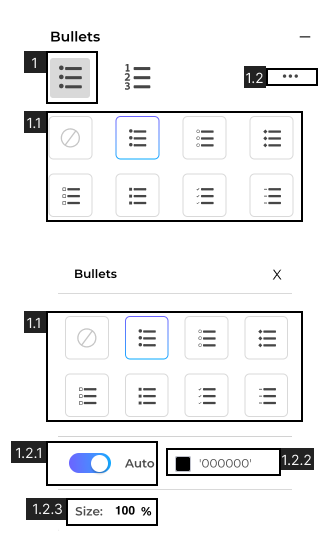
- 1. Select Bullet type.
- 1.1. Select Bullet Appearance.
- 1.2. Advance Bullet options.
- 1.2.1 Bullet Color toggle, when turned ‘ON’ bullets will automatically match with the text color.
- 1.2.2 View or select to change bullet color.. Learn more about Fill.
- 1.2.3 View and set bullet size.
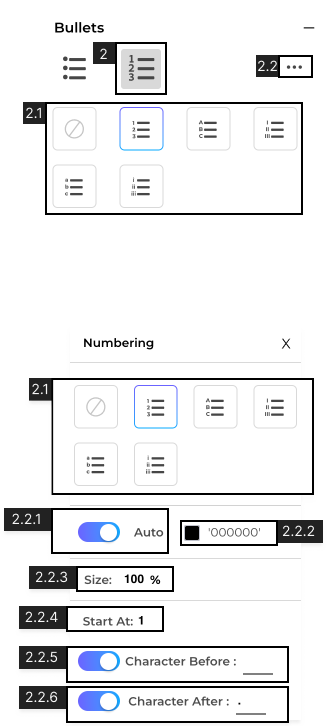
- 2. Bullet type ‘Numbering’.
- 2.1 Select Bullet Appearance.
- 2.2 Advance Bullet options.
- 2.2.1 Bullet Color toggle, when turned ‘ON’ bullets will automatically match with text color.
- 2.2.2 View or select to change bullet color. Learn more about Fill.
- 2.2.3 View and set bullet size.
- 2.2.4 Set the number to start bullet numbering from.
- 2.2.5 Toggle ‘On’ to add a character before bullet numbering
- 2.2.6 Toggle ‘On’ to add a character after bullet numbering